How to Audit Your Own Website with Google PageSpeed Insights
Google built a free tool called PageSpeed Insights that scores your website on performance, accessibility, best practices, and SEO. Drop in your URL, hit Analyze, and you get a full report in about 30 seconds.
It's a developer tool, but the results are readable enough that anyone can get something useful out of it. This walks through what the scores mean and where a non-developer can make real improvements.
If someone else manages your site, send them the report. PageSpeed gives you a shareable URL for each scan. It saves a phone call and gives them exactly what they need to prioritize fixes. The rest of this article will help you understand what you're looking at.
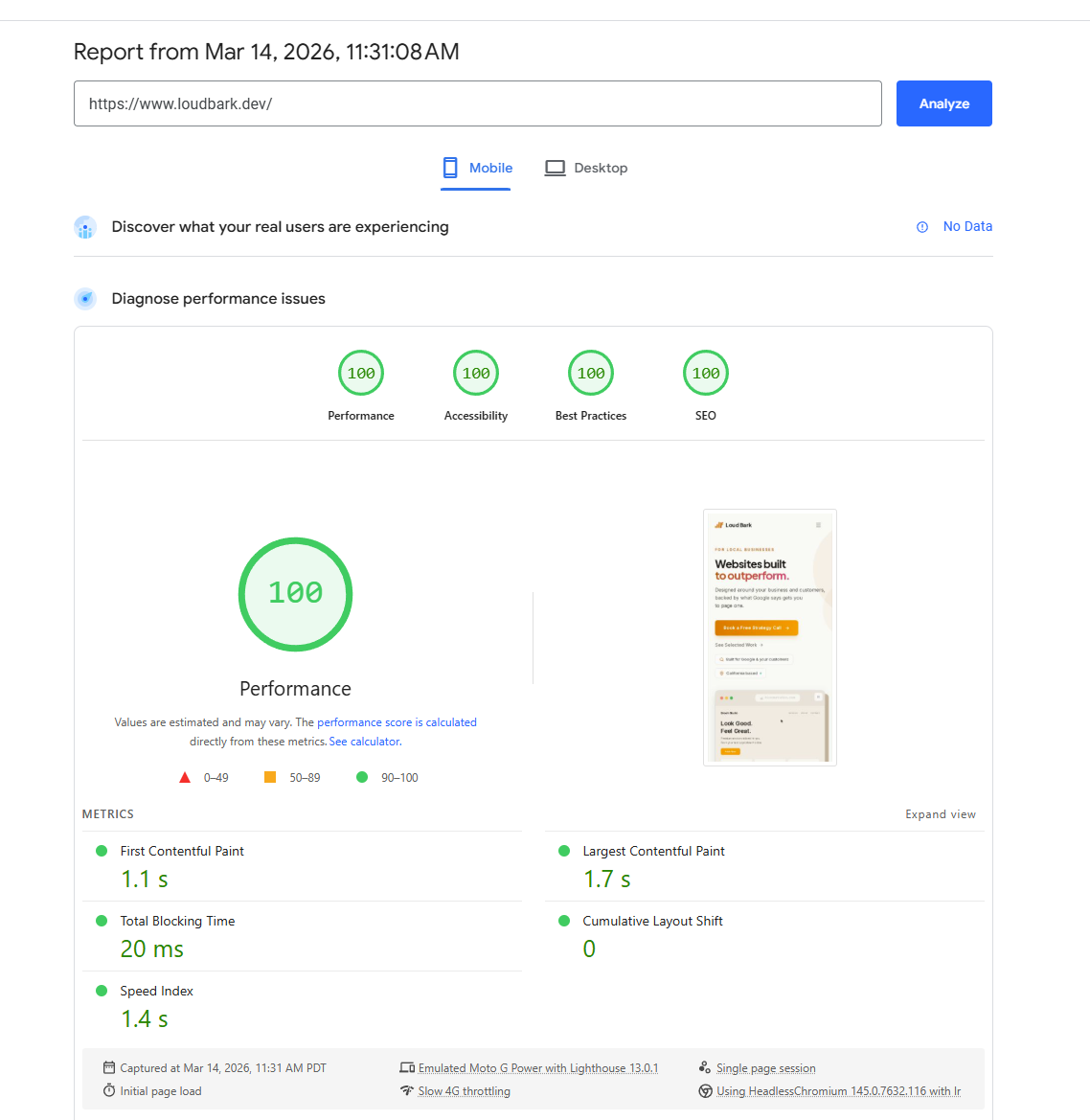
Performance: start with the mobile tab
You'll see two tabs: Mobile and Desktop. Look at mobile first.
Google uses mobile-first indexing, so it evaluates the mobile version of your site when deciding where you rank. A desktop score of 95 doesn't help if your mobile score is 40.
For most business sites, mobile performance in the 70s or above is solid. Below 50, there's real room to improve. But any jump matters. Going from 35 to 55 is a noticeable difference for people loading your site on their phones.
Why speed matters
Google's own data found that 53% of mobile visitors leave a site that takes longer than 3 seconds to load. Half your traffic, gone before they see anything.
The people who do stick around on a fast site are more likely to call, fill out a form, or buy something. And Google has used page speed as a ranking factor since 2018. So a slow site loses visitors and makes it harder for new ones to find you.
FCP and LCP: what's actually slow
PageSpeed shows a handful of timing metrics. Two are worth knowing.
First Contentful Paint (FCP) is when the first thing appears on screen. Some text, a logo, a background color. It's when your visitor knows the site is responding. Slow FCP feels like nothing is happening, and people leave.
Largest Contentful Paint (LCP) is when the biggest element finishes loading. Usually the large banner image at the top of your page or your main heading. This is when the page feels done. Google considers LCP under 2.5 seconds good. Over 4 seconds is poor.
If FCP fires fast but LCP is slow, your visitor sees a flash of text and then stares at an empty box while a huge image downloads. That pattern is the most common performance problem on business sites, and it leads to the easiest fix.
The fix: compress your images
Scroll past the scores and PageSpeed lists specific issues by impact. On most business sites, oversized images are near the top.
A 4MB hero photo from your photographer looks great, but every visitor's phone has to download all 4MB before the page feels loaded. That's usually your slow LCP.
Go to TinyPNG, drag your images in, download the compressed versions. It typically cuts file size by 60–80% with no visible quality loss. Swap the originals on your site for the smaller files.
This one change can move a mobile score from the 30s into the 60s. No code required.
Accessibility
PageSpeed runs a basic accessibility audit too. For a deeper check, Accessibility Checker is a good free companion. But PageSpeed catches two things that show up on almost every business site.
Missing alt text on images. Alt text is what displays when an image can't load and what screen readers read aloud for visually impaired visitors. PageSpeed flags images where it's missing. Add a short description of what the image actually shows. Not "IMG_4392.jpg." Something like "Front desk of our Modesto dental office." You're describing the image for someone who can't see it.
Low-contrast text. Light gray text on a white background looks clean in a mockup but is genuinely hard to read. PageSpeed points out the specific elements that fail and tells you the current contrast ratio vs. what it should be. Fix: darken the text or lighten the background.
SEO: what a 100 actually means
This trips people up. A 100/100 SEO score does not mean your SEO is good. It means your site has the basic structural elements for Google to crawl and understand your pages. Title tags, meta descriptions, valid links, crawlable content, legible fonts.
Think building inspection. Passing means the doors open and the address is posted. It doesn't mean anyone wants to walk in.
The work that actually moves rankings — content strategy, backlinks, local signals, domain authority — none of that shows up here. A site can score 100 and still sit on page five. This score confirms the foundation exists. What you build on it is separate.
Why any of this matters
All 100s shouldn't be the goal. Aim for a mobile performance score in the 60s or 70s and high 90s in the other categories. That's a realistic target for most business sites and it's enough to stop your scores from working against you.
Google wants to serve quality pages. A decent PageSpeed score is one signal it looks at. Others — like having real, credible content on your site — carry even more weight. If you want to understand what Google looks for beyond speed, this piece on E-E-A-T breaks it down.
It also matters for the people actually visiting your site. If a potential client is loading your page in a parking lot with one bar of signal and it takes eight seconds, they're going somewhere else. If they can't read a section because the contrast is too low, same thing. These aren't hypothetical losses. They're the calls and form fills that never happen.

Written by Austin Osorio
Founder & Lead Engineer at loudbark.dev
Austin is a software engineer and the founder of loudbark.dev. A lifelong resident of the Central Valley, he has over six years of experience building high-performance systems. He started loudbark.dev to close the gap between what enterprise companies build and what local businesses can afford.
I use AI as a drafting and editing tool. The direction, advice, and technical detail come from me — I outline the topics, vet the facts, and edit everything before it goes up.
Related
E-E-A-T: How Google Decides Your Site Is Worth Ranking
Google's quality guidelines tell you exactly what they look for in a website. Most of it isn't technical. It's about proving you're real, credible, and worth someone's time.
Why Your Business Isn't Showing Up on Google
Your competitor shows up when someone in Modesto searches for what you do. You don't. Here's what they're probably doing differently.
Want to talk about how this applies to your business?
Let's Talk